Your website is down. Your designer says it is a DNS problem. You ask what DNS means and your hoster sends you a 42-page PDF written by someone who has been doing this since 1998. Two days later the site is back, you still do not know why, and you have agreed to a € 15 monthly addon that does not solve the original problem.
This guide closes that gap. It explains what a domain, a registrar, a nameserver, a DNS record, and an email setup actually are, how they connect, and why bundling them at the same cheap hoster is the most expensive decision in your entire web stack.
The four things that have to talk to each other
A website is four products that have to agree with each other every single time someone visits your domain.
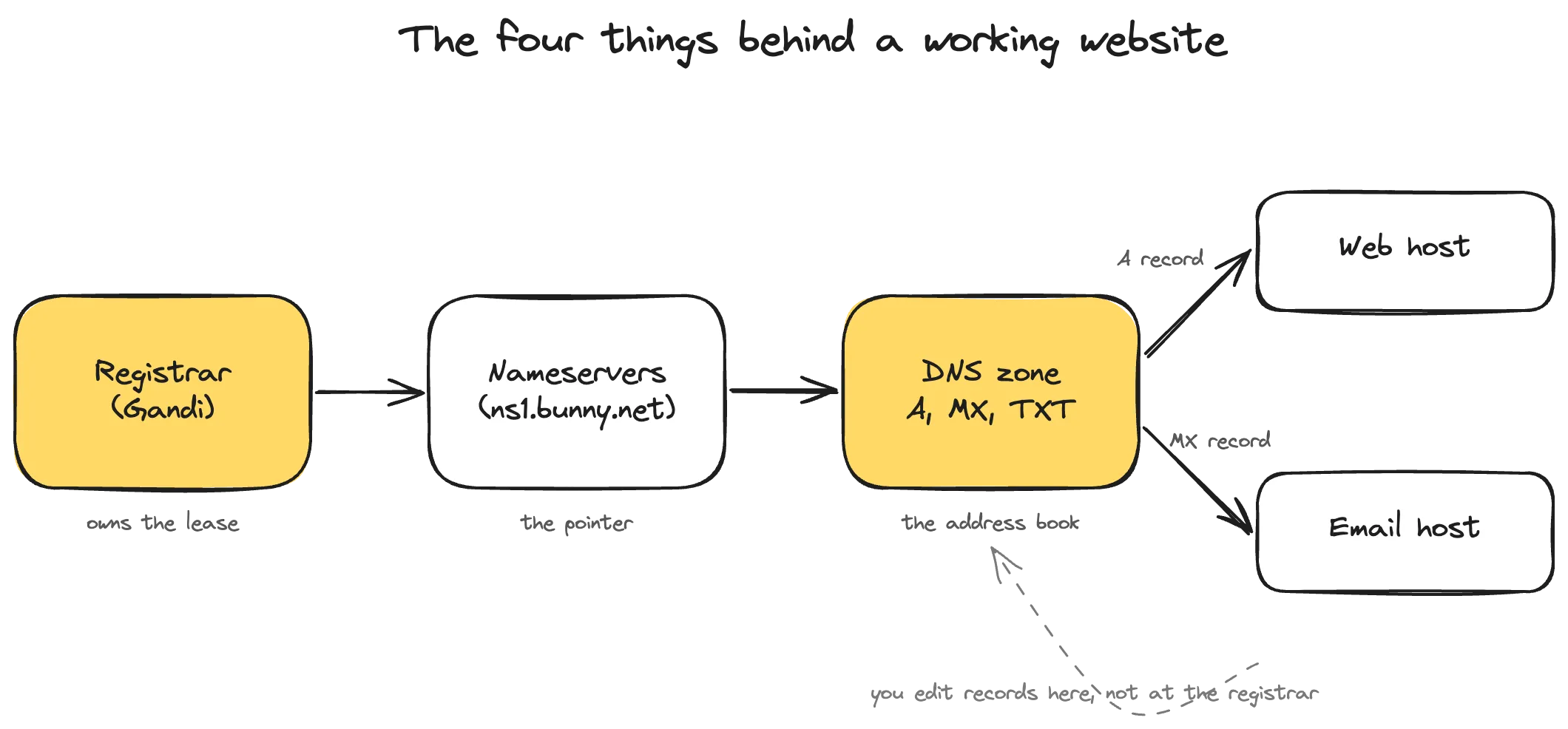
The registrar owns the lease on yourdomain.com. The nameservers are a pointer the registrar publishes. The DNS zone is the address book that lives on those nameservers and tells the world what your domain means. The hosts are where your website actually runs and where your email actually arrives.
Most cheap bundled hosters sell you all four together. That is convenient on day one. It is a problem on every day after that, because the moment you want to change one of those four, the bundle starts working against you.
What a domain registrar actually does
A registrar is the company you pay to keep your domain registered. That is the whole job. They do not run your website. They do not host your email. They speak to the registry (the authority that runs .com, .at, .de, and so on) on your behalf, and they keep the WHOIS record in your name.
What the registrar controls: your renewal, your WHOIS contact data, the authorization code needed to transfer the domain elsewhere, and the nameserver setting that decides who runs your DNS. That is it. Anything beyond that is upsell.
What happens when you forget to renew: a grace period of about 30 days, then a redemption period where recovery costs over € 100, then the domain drops back into the open market. If your business runs on that domain, the recovery fee is the small part of the bill. The two weeks where every email bounces and your homepage shows a parking page are the expensive part.
The right registrars are boring. Gandi (France) has been running since 1999, handles European TLDs cleanly, charges around € 18 per year for a .com with WHOIS privacy included, and does not try to sell you anything you did not ask for. The companies you should be careful of are the ones that hide the transfer code behind a phone call, charge extra to release your domain, or bury the renewal price under a low first-year teaser.
Nameservers: the single switch
The nameservers are the only piece of information the registrar publishes about your domain on the wider internet. They look like ns1.bunny.net and ns2.bunny.net. They are not your DNS records. They are a pointer that says “this domain’s records live over there.”
That pointer is the single most powerful setting in your whole stack. Set it to your registrar’s nameservers and the registrar runs your DNS. Set it to Bunny and Bunny runs your DNS. Set it to the nameservers of your bundled hoster, which is the default when you sign up, and the bundled hoster runs your DNS.
Changing the nameserver setting is the cheapest, most reversible decision in this whole guide. It also happens to be the decision cheap hosters make the hardest, because once they run your DNS they control everything downstream of it.
DNS records: the address book
Once a nameserver knows it is responsible for your domain, it serves a list of records. Each record points one specific thing about your domain at one specific address.
The four record types you actually care about:
A record. Points yourdomain.com or www.yourdomain.com at the IP address of your web host. When a browser asks “where is yourdomain.com,” the answer is the IP in your A record. Without a correct A record, no website.
CNAME. Points one name at another name. Used when a service gives you a hostname instead of an IP address. For example, shop.yourdomain.com pointed at yourstore.shopify.com.
MX record. Points “mail for this domain” at your email host. Without an MX record, no email arrives. With the wrong MX record, mail goes to someone else’s mailbox.
TXT record. Free-form text. Used for proving you own the domain (verification strings from Google, Microsoft, Stripe), and for the three email authentication records described below.
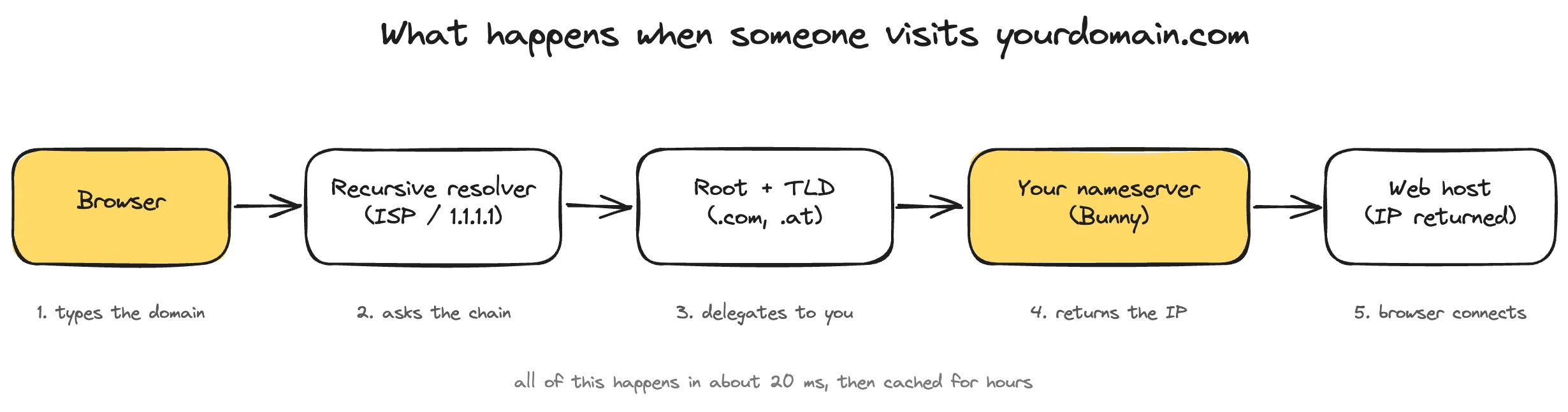
The diagram above shows what happens between someone typing your domain and the page loading. A recursive resolver (their ISP or a public DNS like 1.1.1.1) asks the root servers, then the TLD servers (the .com or .at authority), and finally arrives at your authoritative nameserver. Your nameserver hands back the A record. The browser takes the IP and connects. The whole sequence takes about 20 milliseconds and is then cached for hours.
You can read that diagram once and forget it. The practical point is that the only piece of the chain you control is the last one: your authoritative nameserver and the records it serves. Everything upstream is run by ICANN, the registries, and the resolvers people use. That is why the choice of DNS provider matters more than any other infrastructure choice you make.
Email is mostly DNS
Email is where people get burned the most. Almost everyone reading this has at some point had invoices land in a client’s spam folder, and the reason is almost always misconfigured DNS records on the sending side.
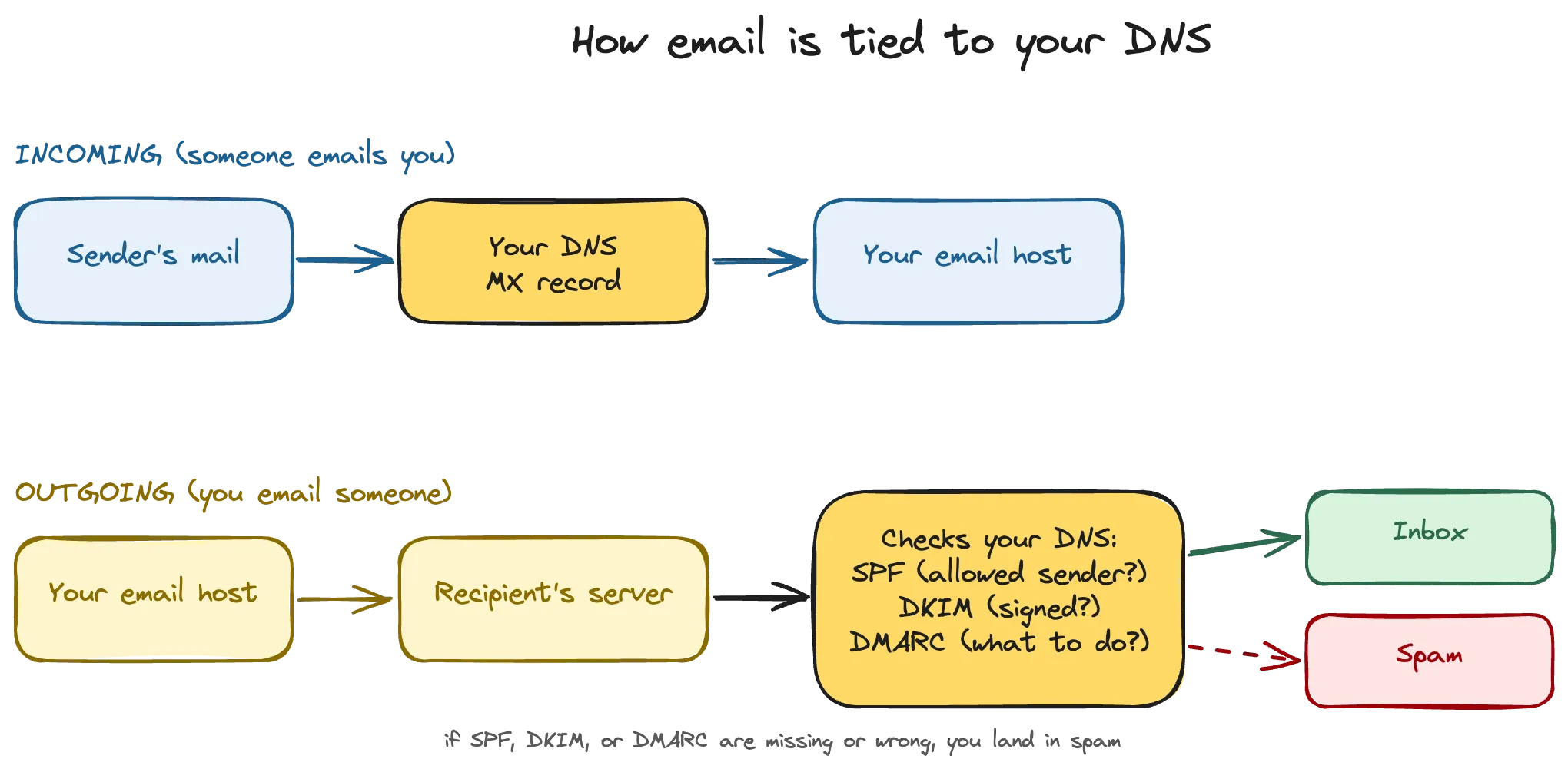
Incoming mail is the easy part. When someone emails you, their mail server looks up your MX record and delivers to whatever email host you have set there.
Outgoing mail is where the trouble lives. The recipient’s mail server does three checks before delivering anything you send, and all three checks read records from your DNS.
SPF is a list of servers that are allowed to send mail “from” your domain. Stored in a TXT record. If the sending server is not in your SPF list, the recipient treats the message as suspicious.
DKIM is a cryptographic signature your email host adds to every outgoing message. The public key for verifying that signature lives in your DNS as a TXT record. If the signature does not verify, the recipient treats the message as suspicious.
DMARC is the policy that ties SPF and DKIM together. It tells the recipient what to do when one of those two checks fails: reject the message, send it to spam, or just send you a report. Also a TXT record. Without DMARC, every recipient falls back to their own guesswork.
Get any of these wrong and your messages start landing in spam the same day. And here is the catch most owners do not learn until something goes wrong: bundled cheap hosters often do not configure DKIM or DMARC for you. SPF is sometimes there, often not, and almost never updated when you start sending email from a second service like a CRM or a newsletter tool. You find out when a client politely asks why the proposal you sent last week never arrived.
Why separation matters
The cheap hoster sells you a domain, a website, a mailbox, and DNS for € 6 a month in one click. That is the offer on the landing page. The actual product, the thing you are paying for over the next five years, is lock-in.
Once everything lives at one provider, the cost of leaving is structural rather than financial. You cannot move your website without breaking email. You cannot move email without breaking DNS. You cannot move DNS without first knowing the exact contents of your zone, which some providers refuse to show you.
Here is what that looks like in practice. Picture moving away from domainfactory, a typical DACH bundled hoster, to a transparent DNS provider. To set up the new zone you need to know what every record points at. Open the domainfactory control panel: you can see that an A record exists, but not the IP address it points to. MX and CNAME values are visible. The A record IPs, the values that decide whether your website loads, are hidden behind their interface. The only way to recover them is to query DNS externally with dig or a service like dnschecker.org, record by record, and guess at any subdomains the control panel does not list. A developer can do this in an hour. A business owner cannot do it at all. World4you and a handful of other DACH bundled hosters run variations of the same playbook: limited record types you can edit, no zone export, support tickets for things that should be a one-click change.
Separation removes the trap. If your domain lives at one company, your DNS at a second, and your email at a third, no single vendor has anything to hold over you. You can move any one of them without touching the other two.
The setup we recommend
For a business website where downtime and email reliability translate directly into lost work, the stack is four separate decisions, made deliberately.
Domain. Gandi. Around € 18 per year for a .com, transparent transfer process, no upselling. Handles European TLDs (.at, .de, .eu) cleanly. GDPR-native, France-based, running since 1999.
DNS. Bunny DNS. Free for up to 500 zones, with standard and smart queries at no charge (Bunny DNS pricing). The cleanest control panel in the industry, every record value in plain text, zone export works, the API is proper. Slovenia-based.
Email. Soverin. Around € 3.25 per mailbox per month, privacy-focused, custom domain included on every plan. Sets SPF, DKIM, and DMARC correctly for your domain, runs in EU data centres, and is not owned by the same company that also wants to read your mail to train an ad model. Netherlands-based.
Web host. Whatever fits your site, decided on its own merits. Bunny is a strong option here as well. Web hosting and DNS at the same transparent vendor is fine, because you can split them at any time. The trap is a vendor that hides things, rather than bundling per se. This still stays a separate decision rather than a default package you cannot escape.
Migrating without downtime
If you are currently on a bundled cheap hoster and want to separate concerns, do not try to move everything in one weekend. Move DNS first, then email, then web hosting. Each step is independent once your DNS lives at a transparent provider.
- Export every DNS record from your current provider. If they offer a zone file export, use it. If they hide the IPs (domainfactory and friends), use
dig yourdomain.com anyand lookup tools like dnschecker.org to capture A, MX, TXT, and CNAME values from the public side of DNS. Get every record written down before you touch anything. - Recreate the zone at your new DNS provider. Add every record you exported, exactly. Do not change anything yet. The new zone should mirror the old one bit for bit.
- Lower the TTL on your old zone to 300 seconds at least 24 hours before the cut. TTL is how long resolvers cache your records, and a lower TTL means faster propagation when you flip the switch.
- Change the nameservers at your registrar to point at the new DNS provider. This is the one change that actually moves DNS. Most resolvers pick it up within an hour, the rest within a day.
- Verify with external lookups that the new nameservers are answering correctly. Then, on its own schedule, transfer the domain to the new registrar. Then move email. Then move web hosting. Each of those moves is now reversible on its own.
Doing the steps in this order means that at no point are two things broken at once. Email keeps working while DNS moves. The website keeps working while email moves. The domain ownership is the last thing you touch, and by then everything else already runs on a stack you control.
The point
Domains, DNS, nameservers, and email authentication are the plumbing. Most owners only think about them when something is already broken, and at that point the bundled hoster has them in a corner with limited options and an expensive support call.
The fix is upstream of the problem. Buy the domain at a real registrar. Run DNS at a provider that shows you every record. Put email somewhere that takes deliverability seriously. Keep web hosting separate from all three. The total cost is maybe € 5 a month more than the cheapest bundle, and you get back the option to fix things without permission.
If you want someone who keeps the plumbing healthy instead of asking you to learn this for yourself, that is what a website subscription covers. For more on what an active operator actually pays attention to month to month, see What happens to your website after launch.